Release velocity is accelerating but most mobile teams continue to suffer from low automation coverage. Having beautifully documented test cases but still seeing the gap between test intent and execution continuing to widen resulting in painful tradeoffs between speed, quality, and risk that QA teams are forced to make. This is modern mobile development's silent crisis.
While automation has improved, traditional approaches are falling short in the face of constant UI updates, dynamic content, complex user journeys, and device fragmentation. Teams are left managing brittle scripts, high maintenance costs, flaky tests, and spending significant effort translating business scenarios into executable automation. As a result, valuable test assets remain underutilized and automation coverage remains low.
In other words, the issue isn't the quality of the test cases, it's the coverage strategy.
QApilot addresses this challenge through three test authoring modes, each addressing a different automation need. In this article we dive deep into CoWork - QApilot's Agentic Human-in-the-Loop authoring mode. You will learn how CoWork allows teams to convert existing natural-language and BDD test cases into automated test recordings, and helps in increasing automation coverage while keeping users in control throughout the process.
QApilot three test authoring modes
QApilot comes with three authoring modes depending on your needs - fully automatic test generation, human-in-the-loop AI-assisted mode, and click-by-click manual recording.
| QApilot Authoring Mode | Approach | Primary Use Case |
|---|---|---|
| Crawler | Agentic · Autonomous | Explore applications independently and generate tests without human input. |
| CoWork | Agentic · Human-in-the-Loop | Transform existing test cases into automation using AI-assisted execution and dynamic replanning. |
| Record & Playback | RPA · AI-Assisted | Manually capture user interactions for precise and deterministic automation. |
Understanding QApilot CoWork
CoWork was built specifically with QA groups in mind who have significant test documentation they want to automate effectively. CoWork analyzes the live application screen, determines the next action to take and automatically carries it out. If the UI changes or behaves unexpectedly, CoWork adjusts and replans accordingly. This hybrid method provides the smarts of AI without removing QA from the driver's seat.
What sets CoWork apart from other products that accept English or BDD as input is its integration with QApilot's knowledge graph and live agentic intelligence. Other AI testing products create scripts/nested automation from natural language input but CoWork does something much more powerful. As it runs your test cases against the application on a real device, it's constructing and utilizing a knowledge Graph of the application, and helps in increasing automation coverage across user journeys.
Knowledge Graph contains screens, UI elements, transitions, behavioral context it's turning your test execution into a knowledge base that can power other testing activities. This allows the AI planner to understand the app contextually, make decisions based on that knowledge, and most importantly, intelligently replan if it encounters UI shifts, dynamic elements, pop-ups, unknowns, or any unexpected state.
Whats Make CoWork Unique - CoWork Architecture
What sets CoWork apart from other record-and-playback tools or completely autonomous AI solutions is its stateful, context-aware architecture. While many tools can interpret natural language or BDD test cases, they typically rely on isolated, stateless execution or basic locator-based self-healing.
In contrast, QApilot's system works as follows:
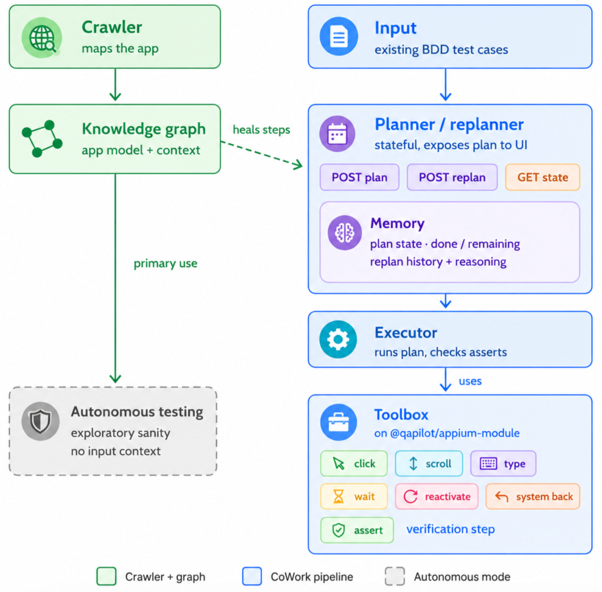
- The Crawler first maps the application and builds a rich Knowledge Graph - a structured model containing screens, UI elements, transitions, and contextual understanding of app behavior.
- This Knowledge Graph serves as shared intelligence across the platform. When CoWork executes your BDD test cases.
- Planner/Replanner leverages this graph along with real-time screen analysis, stateful memory (plan state, done/remaining steps, replan history, reasoning), and a powerful Toolbox of actions (click, scroll, type, wait, assert, etc.) to create and dynamically adapt execution plans.
- The Executor converts high-level plans into actions using the Toolbox and validates outcomes through assertions and verification steps.
- The system doesn't just follow steps — it understands context, makes intelligent decisions, and automatically replans when it encounters UI changes, dynamic elements, pop-ups, or unexpected states.
In the following sections, you will learn how to configure CoWork and create and execute test cases using it.
End-to-End Test Case Creation and Execution with CoWork
CoWork brings a hybrid, smart solution for test automation. Made for enterprise teams who already have test cases, but want to automate them quickly and accurately without manual scripting all the way or coding from scratch.
CoWork follows a clear, structured below six-step process:
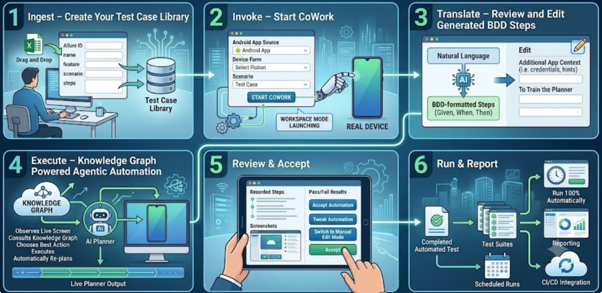
1. Ingest – Create Your Test Case Library
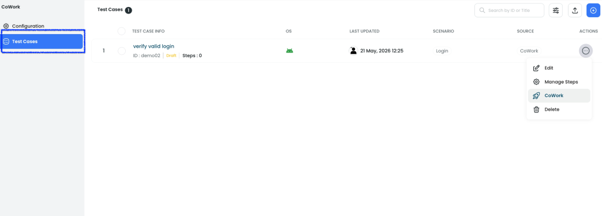
- Click on CoWork from in the left sidebar. There are two tabs here, Configuration and Test Cases. The Test Cases tab will show you the CoWork Test Case Repository.
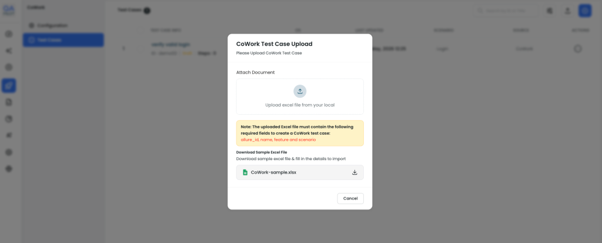
- Upload test cases in batches using the Excel template or enter them manually. Required fields are Allure ID, name, feature, scenario and steps.
Open Test case section from the left panel.
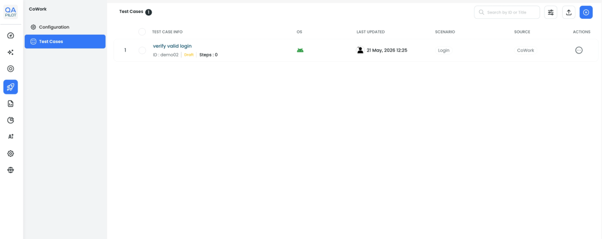
Upload Test Case Sheet to add Cases and Steps into the platform -
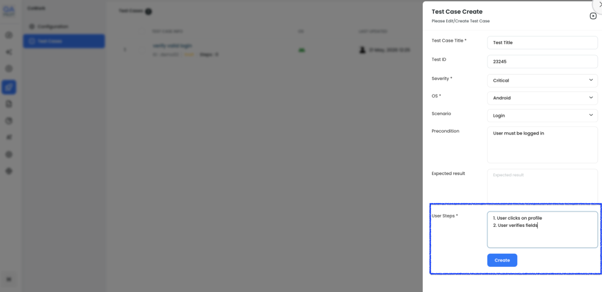
We can also write test cases manually through Test Case Create -
2. Invoke – Launch CoWork
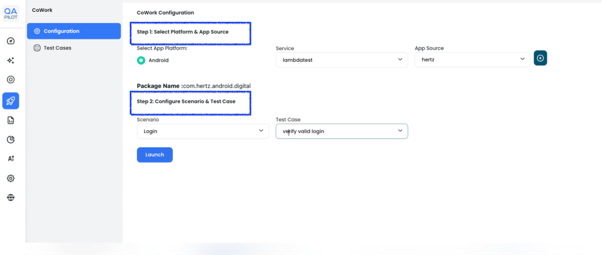
- Choose which Android app source, device farm, scenario and test case to execute. CoWork will find and connect to a real device then launch into workspace mode.
Configuration Screen - In the below screenshot you can see there are TWO steps to select the platform and configure the scenario and test case.
Test Cases Screen -
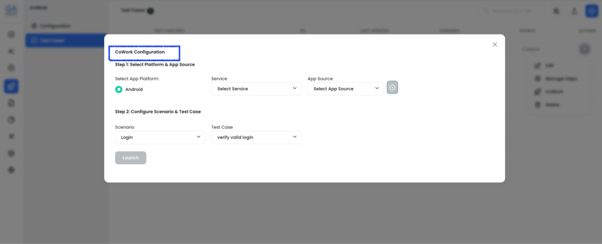
Launch CoWork post Configuration - After clicking on Launch, CoWork will grab a device from your device farm and connect you live.
3. Translate – Review and Edit Generated BDD Steps
- CoWork transforms your natural language into editable BDD-formatted steps. We can add value to steps with Additional App Context (i.e. credentials, hints, test data etc) to train your planner for better accuracy.
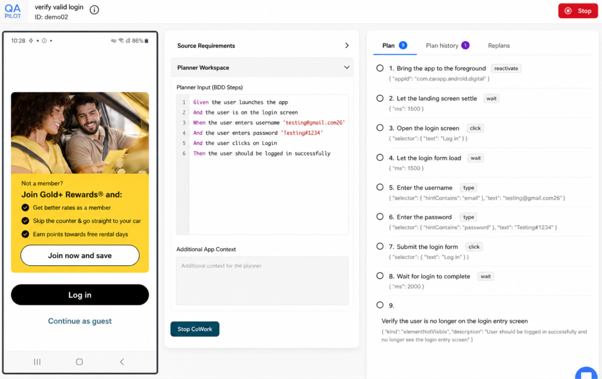
- The CoWork workspace is split into three panels
In the below screenshot you can see all three panels -
Left Panel – Live Device
Real-time mirror of mobile device view where CoWork executes and displays actions on the launched application.
Center Panel – Planner Workspace
Planner Workspace Interactive workspace for reviewing source requirements, editing BDD steps, adding app context, and starting automated or manual execution.
Right Panel – Planner Output
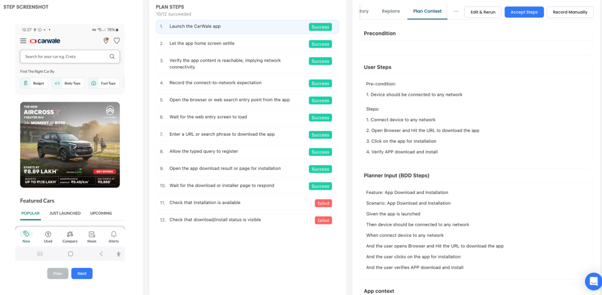
Live execution view showing plans, replans, and step status with actions, selectors, and real-time progress updates.
4. Execute – Knowledge Graph Powered Agentic Automation
- Your AI planner observes the live screen, consults your ever-growing Knowledge Graph, chooses the best action to take, executes, then automatically re-plans.
- You can watch your test execute on the live device screen being mirrored and follow along with live planner output.
5. Review & Accept
- Review recorded steps, screenshots, and pass/fail results. Accept automation, tweak it or switch to manual edit mode.
- Once execution completes, the plan steps are displayed with their final status. Review the run and choose how to proceed:
- We can Click on "Accept Steps" (refer below screenshot) to save all generated steps to the test case on the platform.
6. Run & Report
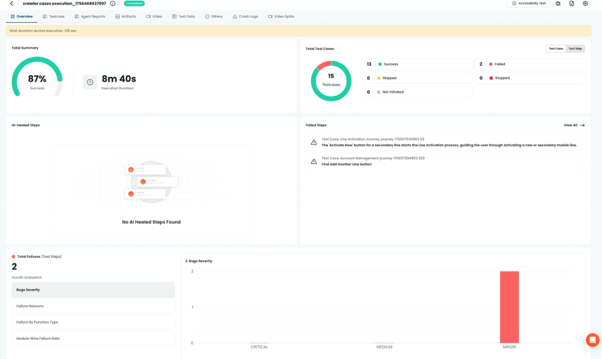
- View report summaries, failure charts, test counts, and step details from QApilot's dashboard for executed test cases and runs in one place.
- Navigate to view details on any specific reports. QApilot Reports Dashboard is the control panel that provides a comprehensive overview and detailed analysis of all executed test cases.
Report dashboard
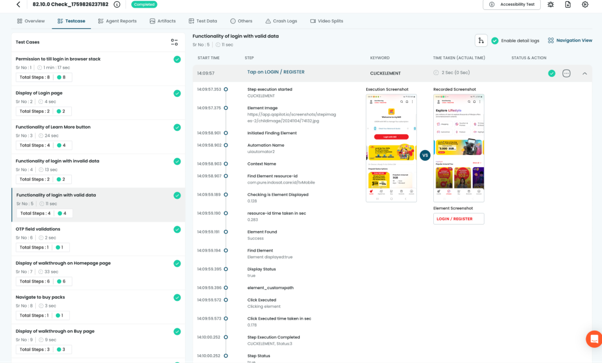
The Test Case section in QApilot's Reports provides a detailed, step-by-step breakdown of how each test case was executed.
Conclusion
CoWork https://qapilot.io/product/cowork combines requirement-driven automation, smart planning, and live execution to offer a more robust solution for mobile testing. Capable of automatically generating BDD steps from source requirements, execution plans, and dynamic replanning as the application under test changes behavior, all the way down to execution.
CoWork's another powerful distinguishing factor is its Knowledge Graph, constructed by crawling the application simultaneously while taking screenshots and saving UI elements, transitions and relationships between elements and context around them. This context-aware understanding allows planners to reason better about the choices it makes, enables it to recover from changes and make execution more reliable.
QApilot's CoWork is live on Product Hunt!
We'd love your support. Check out the launch and share your thoughts here:
QApilot's CoWork: 3x Automation. Same QE Team. | Product Hunt
Want to see CoWork in action?
Explore what CoWork can do for your team: CoWork