Part 1 of my Visual Reasoning Showdown
Everyone keeps saying AI can "see" now. It can describe your vacation photos, read street signs, even get your memes. But I had a simpler question: Can it actually find a button on a phone screen?
Turns out? Mostly no. But a couple of models absolutely blew my mind.
The Challenge
I wanted to know if AI could do something we do without thinking, glance at an app and immediately spot what we're looking for. The login button. The search icon. That "Get OTP" button hiding at the bottom.
Why does this matter? Because if AI can do this reliably, we're talking about apps that test themselves, tools that help people with disabilities navigate their phones, software that actually understands interfaces. Real stuff.
So I ran an experiment.
The Setup (The Simple Version)
I gave each AI model a screenshot of a mobile app and asked it to find something specific. No hints. No arrows. No "it's in the top corner" clues.
Just: "Here's a screenshot. Find the search button."
The model had to look at the mess of buttons, text, and icons, then tell me exactly where the thing was.
How I Scored Them
Here's where it gets interesting. I didn't just check if the AI pointed somewhere "close." Close doesn't cut it when there are twenty buttons on screen.
I checked three things:
Did it find the actual element? Every button has a unique identity in the app's code. I checked if the model pointed at the right one or just something nearby. This separated the "got lucky" from the "actually understood."
How well did it draw the box? The model draws a box around where it thinks the element is. I measured how much that overlapped with the real thing. Perfect match? 100%. Barely touching? Near 0%.
How far off was it? Basic stuff. If you tried to tap where the model said, would you hit the right button? I measured the distance in pixels.
You need all three because a model might get super close but still point at the wrong thing. Or find the right element but totally misjudge its size.
Show, Don't Tell
Let me show you what happened when I asked models to find the "Get OTP" button in a telecom app—that orange button at the bottom.
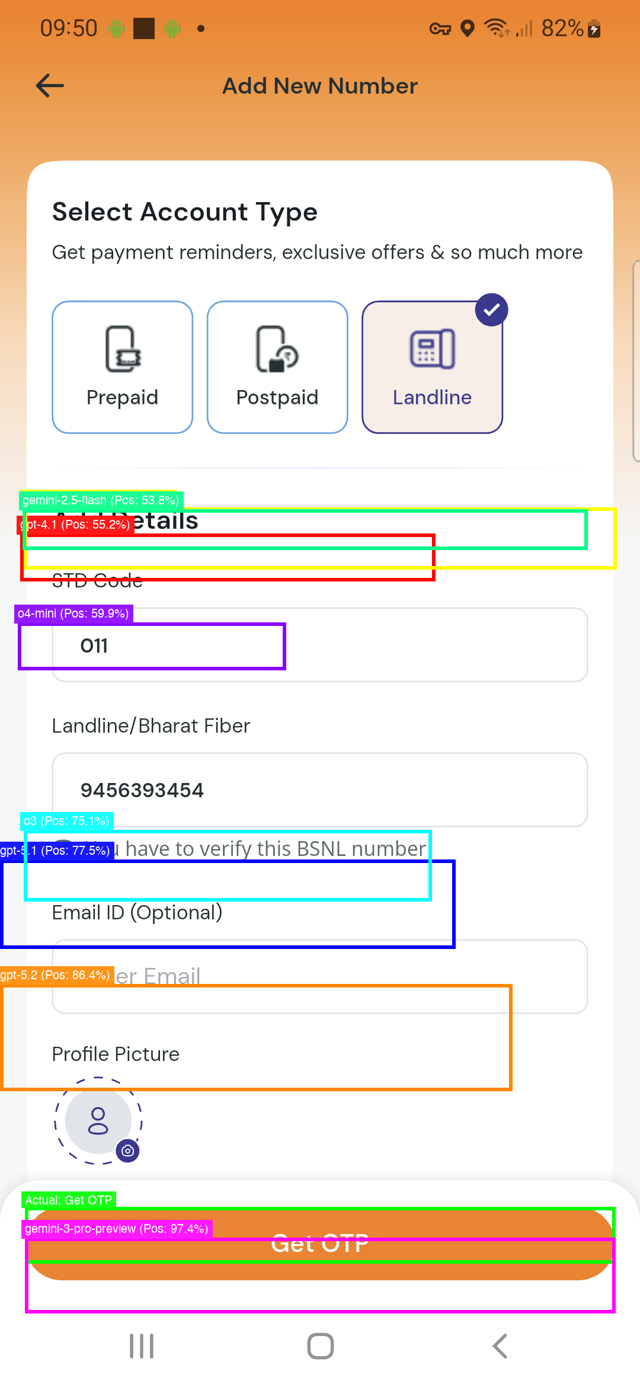
Each coloured box shows where a different model thought it was:
Green box (Gemini-3) - Nailed it. Perfect.
Orange box (GPT-5.2) - Really close!
Blue box (GPT-5.1) - Uh oh. That's the email field, not the button.
Cyan box (O3) - Way off. Not even close.
Purple box (O4-mini) - Pointing at a completely different section.
Red box (GPT-4.1) - In the ballpark but missed the target.
Light green (Gemini-2.5) - Also struggling.
One screenshot tells the whole story. Some models can pinpoint exactly what you're asking for. Others are throwing darts blindfolded.
The Results
I tested OpenAI's GPT models and Google's Gemini variants across real apps - travel sites, shopping apps, telecom interfaces.
Gemini-3-pro-preview crushed it. Here's what I mean: I'd show it a screen with 25 buttons, and it would point to the exact right one half the time. Not just the right area - the actual button I asked for.
The catch? It took over a minute per task. That's... slow.
GPT-5.2 was the surprise winner. It found the right element about 33% of the time and did it all in 6 seconds. Six seconds! That's fast enough to actually build something with.
The older models? They'd get to the right neighbourhood maybe 70% of the time, but almost never picked the actual element. They were basically guessing at regions and hoping for the best.
Why This Actually Matters
When I say Gemini-3 had a "50% success rate," you might think "meh, coin flip." But context:
It's looking at an app it's never seen
There are 20-30 similar-looking elements
It gets zero hints
And it still picks the exact right one half the time
That's genuinely impressive.
Most older models? 0% success rate at identifying the correct element. They could wave in the general direction, but couldn't point to what you actually wanted.
Speed vs. Accuracy
Which should you use?
Need perfection? Gemini-3-pro-preview. If you're building automated testing where getting it exactly right matters more than speed, the wait is worth it.
Building something people will use? GPT-5.2 is the sweet spot. Accurate enough to trust, fast enough to not be annoying. This is what I'd use for anything real-time.
Just need rough guesses? Honestly, the older models aren't reliable enough. Save yourself the headache.
What Surprised Me
The top models worked everywhere. Travel apps, shopping apps, weird telecom interfaces - didn't matter. They just worked.
When models were wrong, they were spectacularly wrong. I thought they'd be "close but not quite." Nope. Often they pointed at completely different parts of the screen.
There's a huge gap between "sort of close" and "actually correct." Lots of models could get to the general area. Very few could identify the right element. That gap matters.
What's Next
This was just round one. Finding UI elements. I've got more visual challenges coming:
Can they read charts and graphs accurately?
How well do they understand spatial relationships?
Can they solve visual puzzles?
And a few other tests I'm keeping secret for now
The goal? Figure out what these models can actually see versus what they just appear to see. Because there's a difference, and it's bigger than you think.
Note: All the percentages and performance numbers you see here are based on tests I ran across multiple real-world apps - travel sites, shopping platforms, telecom interfaces, and more. Each model got the same challenges, same screenshots, no special treatment.